
Calibrated Accurate Level2.1.0 - Google Play
You'll be able to see results in few seconds.
Publisher Description
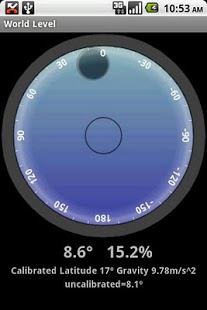
Probably the Most Accurate Digital Level Available.
Other angle and level apps have beautiful graphics, but none are as accurate (as far as I can tell!)
Measure angles more accurately.
* Unique Latitude Calibration with local gravity and GPS
* Advanced Trigonometry
* Sophisticated Sensor Analysis.
The world is not perfectly round, and gravity changes with your location. This is the only level I know of that calibrates for latitude. This app shows you the local gravity value and the calibrated and uncelebrated angle values for comparison.
If you live “in the middle” your existing digital level may be fine, for example OH, PA, RI, UT, WI, WA; Paris, Munich, Rome, Wellington NZ, and Trelew AR. These places are between the equator and a pole. If you live closer to the equator or north or south then your existing digital level may not be giving you the correct values.
Try This Test With Your Existing Digital Level:
1. Small Angles) This level will accurately measure angles close to 0 degrees *and* 90 degrees. Check if the level you are using can measure 1 degree *and* 89 degrees by slightly tilting your phone. We have seen many levels that can read well close to 0 but poorly close to 90, and vice versa.
2. A 90 Degree Rotation) This level can measure a 90 degrees rotation. Hold the phone in one direction, check the reading (0 or 90 degrees) and slowly rotate it 90 degrees. Watch the reading. This level will smoothly read from 0 to 90. Now try that with your existing level. We have seen popular digital levels with beautiful graphics read 96 degrees when rotating the phone 90 degrees!
3. I Do Not Live In The Middle) If you do not live near one of these states or cities then a digital level needs to know your location to accurately measure angles: OH, PA, RI, UT, WI, WA; Paris, Munich, Rome, Wellington NZ, and Trelew AR.
World Level gives values in degrees and grade (slope)
Permissions: GPS/Location to get your latitude and calibrate the level. You can use the app with GSP turned off and set your location using the menu options (some android versions require GPS turned on). Internet to send *anonymous* info on your phone model, android version, and language settings so I can support the popular phones and languages. This info is sent to flurry.com. You can turn this ON/OFF in the menu.
New: Angle and % Grade, app to SD card, large screen size, bug fix. Angle Incline and Slope
If you find this app useful please add a rating. Thank you.
Full info, screen shots, TOS on web site. Spirit level World Level
About Calibrated Accurate Level
The company that develops Calibrated Accurate Level is Marplotter. The latest version released by its developer is 2.1.0.
To install Calibrated Accurate Level on your Android device, just click the green Continue To App button above to start the installation process. The app is listed on our website since 2010-11-01 and was downloaded 0 times. We have already checked if the download link is safe, however for your own protection we recommend that you scan the downloaded app with your antivirus. Your antivirus may detect the Calibrated Accurate Level as malware as malware if the download link to com.marplotter.level is broken.
How to install Calibrated Accurate Level on your Android device:
- Click on the Continue To App button on our website. This will redirect you to Google Play.
- Once the Calibrated Accurate Level is shown in the Google Play listing of your Android device, you can start its download and installation. Tap on the Install button located below the search bar and to the right of the app icon.
- A pop-up window with the permissions required by Calibrated Accurate Level will be shown. Click on Accept to continue the process.
- Calibrated Accurate Level will be downloaded onto your device, displaying a progress. Once the download completes, the installation will start and you'll get a notification after the installation is finished.
Program Details
System requirements
Download information
Pricing
Version History
version 2.1.0
posted on 2010-11-01
Angle and % Grade, app to SD card, large screen size, bug fix. Incline Slope
version 2.1.0
posted on 2010-11-01
Several fixes and updates
Disclaimer
Official Google Play Link
We do not host Calibrated Accurate Level on our servers. We did not scan it for viruses, adware, spyware or other type of malware. This app is hosted by Google and passed their terms and conditions to be listed there. We recommend caution when installing it.
The Google Play link for Calibrated Accurate Level is provided to you by apps112.com without any warranties, representations or guarantees of any kind, so access it at your own risk.
If you have questions regarding this particular app contact the publisher directly. For questions about the functionalities of apps112.com contact us.
